Showing posts with label Tips and Tricks. Show all posts

Weight Loss Tips

Weight Loss Tips
Weight Loss Tips


How to loss my weight is always questions me when you see the following symptoms.

  1.     A higher than normal body mass index or BMI
  2.     The scale showing that you have gained weight
  3.     Clothes feeling tighter and needs larger size
  4.     Having bulged waist
  5.     Breathing problems
  6.     High blood pressure
  7.     Diabetes
  8.     Joint pain
Now stop worrying about problems! Weight loss is just as easy as you believe.

The following tips will help you to loss your weight in much faster way and by keeping them running in your day in life.

Eat only two big meals daily

In ancient times, it was routine to eat only two major meals a day, but three has become today's cultural norm today.

Designate a "PV" meal

For your biggest meal of the day, combine a lean protein main dish with a side of vegetables, skipping starches and grains. Add a glass of dry red wine if you wish. The protein source could be chicken, fish, meat, or a soy product—think teriyaki salmon with sautéed vegetables or a chicken salad.

Fine-tune your lunch

at whatever type of food you’d like, such as one moderate helping of protein and one moderate helping of your favorite starches and grains, but for any second helpings only take veggies.

Get moving!

Even regular light exercise improves mood and controls appetite. Start with just 10 minutes of cardiovascular exercise three times a week, which can include vigorous activities like jogging or jumping rope or more gentle workouts, like walking briskly or leisurely swimming.

Resist cravings

If you still feel hungry after hydrating, try fat-free or low-fat dairy between meals, like yogurt or cottage cheese. Or, nibble on fresh fruit.

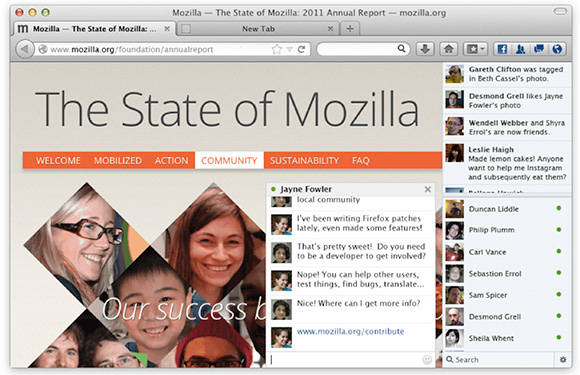
Now start accessing facebook messenger from firefox browser with simple add-on installation

facebook messenger firefox addon
Firefox Facebook Messenger

You may always wanted to keep your messenger on top of your browsing instead in Facebook page.

Mozilla the awesome open source firefox browser has enabled this feature. 

Finally Mozilla officially launched Facebook Messenger for all the Firefox fans. Now you can chat with your friends and stay connected with their new updates with Facebook messenger on Firefox. 

When you enable the Facebook messenger on your Firefox web browser, it will show you a social sidebar. You can get all the Facebook updates with this, like chat message, new comments and new photo tags. And also you'll get all the notification for new friend request, new subscribers, and messages. 

How to add facebook messenger to your firefox browsers:

This can be done by installing addon to your browser.

1) Update your Firefox to latest version.
2) Go to Facebook Messenger for Firefox page.
3) Click on Turn On Button.


Download add-on link: https://addons.mozilla.org/en-us/firefox/addon/facebook-messenger/


How to find facebook password

The below video gives you demo on how to find facebook password of someone.


Tips to speed up the Nexus

It's time to watch the below video which demonstrate applying tips to speed up the nexus based devices.


Please comment all your questions here and get your quickly solution.

Networking Tools for your daily use

Networking Tools @techrefer
Networking Tools
Stop worrying about all your networking issues!

Yes, mentioned below tools are light weighted applications to diagnose and find better solutions for all your networking issues.

Looking for some network utilities? There are plenty of options, but don't waste time on the bulky and more heavyweight contenders, unless you really need them - our Tiny Tools may provide all you need.

If you'd like to find out what software is installed across your network, for instance, you could install some expensive commercial solution, complete with database, analytical tools and more. But we've found a 160KB program which will scan all your network PCs for no cost at all.

And capturing network traffic normally involves installing complex utilities, and a supporting library or two. But if you can get by with raw sockets then the 20KB RawCap will get you started in seconds.

This is just the start, though. Other tools in the list will help with performance issues, network management, security, file sharing and more. And they're all free, and very lightweight: even installing all ten will use less than 7MB hard drive space.

1. Network Stuff 3.0.9 - 1.34 MB

Network Stuff
Figuring out what's happening on your network normally involves a whole library of tools, yet somehow Network Stuff has managed to cram them all into a single portable application.
It's strong on the basics, for instance: the program can display your IP addresses (both local and external), scan your network for other systems, reveal MAC addresses and run graphical ping or traceroutes to the addresses you specify.

But Network Stuff can also display all the currently open network and internet connections; use built-in Whois and DNS tools to get more information on IP addresses; remotely wake up or shut down other systems on your network, and the list goes on.

The only problem here is complexity, as there's a lot to explore. If you get lost, though, check the author's website for some helpful guidance.

2. DNS Jumper 1.0.5 - 812KB

DNS Jumper
Changing your DNS settings can improve your online security, perhaps give you access to sites you couldn't reach otherwise, and improve your browsing speed. Windows doesn't exactly make this easy, but that's where DNS Jumper comes in.

This tiny tool comes with a lengthy list of DNS alternatives. If you're not sure which is best then it can test them all to find the fastest. When you're happy, it's able to apply your preferred DNS settings in a click, and the program can even back up and restore your original settings to avoid the chance of any problems.

3. RawCap 0.1.4.0 - 20KB

RawCap
Packet sniffing - capturing network traffic for later analysis - can be an invaluable way to diagnose tricky network problems, both hardware and software. And there are few easier ways to get the job done than with the super-lightweight RawCap.

The program is a command line tool, but it's also straightforward to run from Explorer. Just double-click the file, choose your network interface, enter an output file name, and that's it - the program will capture raw packets and save them in a .pcap file.

Unsurprisingly for a 20KB tool, there's no help here to analyse the finished results. Just opening the file in Notepad may be enough, though if you're looking for plain text. And there's no doubting RawCap's simplicity: it doesn't need any other components or DLLs beyond the .NET Framework 2.0.

4. Fast Software Audit 1.0.0 - 160 KB

Fast Software Audit
If you manage a PC network then you'll know it's important to keep track of the software your users are installing. You could check this manually, or invest in some big corporate inventory tool, but the ultra-compact Fast Software Audit - portable and only 160KB - could be enough. Just enter the network names of the computers you'd like to audit and it'll quickly scan them, revealing the list of installed applications. (Though please note, your systems will need the Remote Registry service to be running for this to work.)

5. CloseTheDoor 0.2.1 portable - 484 KB

CloseTheDoor
When you want to secure your network it's important to understand which processes are listening for connections, and the portable CloseTheDoor will tell you everything you want to know: the network interface, ports, protocols, process, related Windows services and a whole lot more.

All this information can seem baffling at first, but CloseTheDoor can help. Right-click something and you'll find options to search the web for useful information on the process, port and how it's generally used.

And if you do identify malware then CloseTheDoor can even shut down that process, though be careful - if you accidentally terminate something important then you might crash your PC.

6. BlueLife Hosts Editor 1.0 - 388KB

BlueLife Hosts Editor
The HOSTS file can be used to tell Windows the IP address of various network or Internet resources, so improving performance or allowing you to block some sites or resources entirely.
Windows doesn't make it particularly easy to access HOSTS, unfortunately, but the BlueLife Hosts Editor probably provides everything you'll need. Just launch the program to view your current HOSTS file, then add or remove entries to suit your needs, and save the results when you're finished: easy.

Beware, though, if you try to block a site you've just visited then it'll appear not to work, as Windows will cache the previous IP address. Save the new file, click "Flush DNS" and everything should now work just as you expect.

7. Network Activity Indicator 1.6 -1.03 MB

Network Activity Indicator
We often miss the old Windows XP network icon, where the monitors flashed to show network activity. But now there's an easy way to get it back. Install Network Activity Indicator and it'll immediately restore the same icon to your system tray. (Although Windows Vista/Windows 7 will often hide it again: click the arrow to the left of the system tray area, click Customize and set "Network Activity Indicator" to "Show icon and notifications to bring it back.)

This isn't just a cosmetic tool, though. You can also customise the program to flash only for particular network traffic (TCP, UDP, ICMP), or on specific network interfaces. And it's even able to provide details on network traffic (MB's uploaded and downloaded), and a host of useful statistics (open connections, failed connection attempts, errors received, more).

8. RemoteRebootX 2012 - 428KB


RemoteRebootX
Network management can be easier than you think. If you've got a copy of RemoteRebootX to hand, anyway.

Add the names of your network computers to the program, and in click or two you can then remotely shut them down or wake them up again, all from the comfort of your own PC.
You can even automate the process, for example having a PC woken up just after lunch so it's ready and waiting when you return.

And there are even system information options to, say, retrieve the free C: drive space on one of the systems, or its list of automatic but stopped services (very useful for troubleshooting). Not bad at all for a portable tool under 500KB in size.

9. HFS 2.2f - 560KB

HFS
When you want others on the network to be able to access your files then you'll probably start by sharing folders. But if you can't get that working as you like then setting up a web server with HFS could be a simpler approach.

There's no complex configuration involved, for instance - just run the program and it's ready to go.
Drag and drop the files you'd like to share and they'll be accessible within seconds.

And yet there are plenty more advanced options, if you need them. Worried about the program taking up all your bandwidth, for instance? Just limit the download speed to suit your requirements - it's all very easy.

10. Simple IP Config 2.3 - 1.32MB

Simple IP Config
If you regularly use a laptop on a couple of networks - home and work, say - then the chances are you probably waste a lot of time manually adjusting a host of low-level network settings. But it doesn't have to be that way.

Simple IP Config allows you to create separate network profiles for home, work, and anywhere else you like. Each of these can be used to store your IP Address, Subnet Mask, Gateway, DNS Server, and so on. And switching from one profile to another is as simple as selecting it, and clicking "Apply" - no messing around in Control Panel is required at all.

Tags: networking, Network Tools, troubleshooting, Tips and Tricks, tools, small applications, Utility Software, network diagnose, networking utilities, network scanning, DNS, online security, packet sniffing, resource monitoring, network status monitoring, remote control, 

Source: http://www.techradar.com

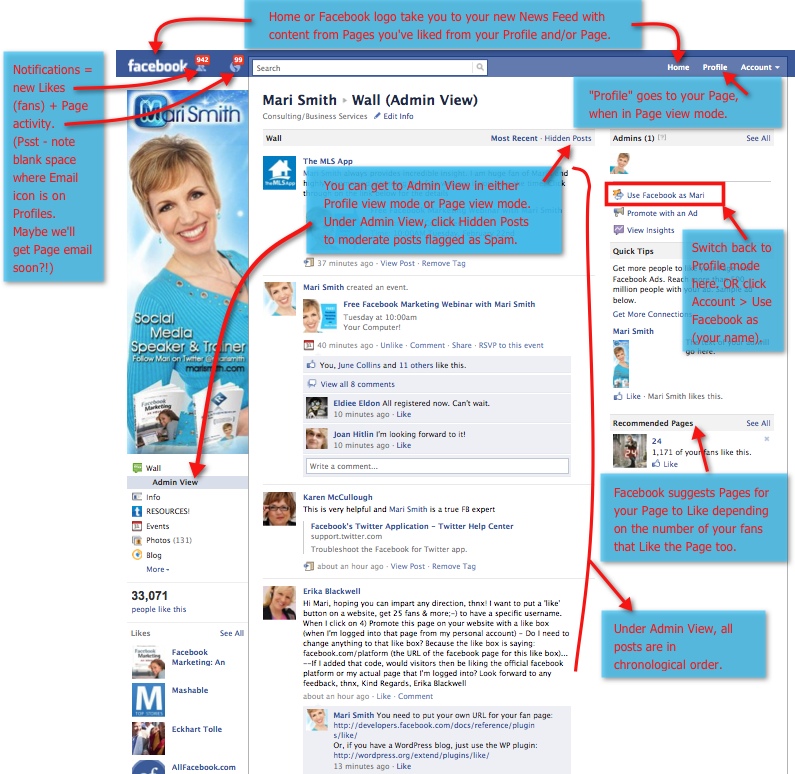
Hidden Secrets About Facebook Pages

Facebook Pages Hidden Secrets @techrefer
Facebook Pages
There are few hidden things about facebook pages and listed below are for your kind reference.

1. Target Posts to Specific Locations and Languages

As an international brand, you can target posts to certain countries or languages.

2. Pin Posts to the Top of Your Profile

You can "pin" a recent post to the top of your profile. The tool is useful for highlighting content you want people to notice straight away.

3. Reposition Photos

Reposition photos you've posted to ensure they look as great as possible when people are browsing your timeline.

4. Turn Off Messaging

We love the new ability that allows people to message brands. But if it's not relevant to your page, you can disable it.

5. Share Other Facebook Pages to Your Profile

If you want to highlight other pages related to your brand, you can "Share" them to your brand's profile.

6. Create a Poll

Did you know you can ask your page followers questions? The really handy poll feature is built into the timeline design.

7. Highlight Posts

If you want to make certain posts more noticeable, highlight them. This means they stretch across the double width of your timeline.

8. Edit Your Favorites Boxes

You can change the order of some of the boxes that appear beneath your cover photo.

9. Make Use of Your Activity Log

If you want to find a past post quickly or review certain types of content, rather than scrolling down your timeline, use the activity log as a quick tool.

10. Create a Featured Likes List

While it's easy to "Like" other pages and brands, there's a cool way to highlight these "Likes" to visitors to your page.

11. Remove the "Recent Posts by Others" Box

You may not want to draw attention to recent posts by other people to your timeline. If this is the case, remove this box all together.

Read More...


Make your flashdrive virus proof

Most of malware found now-a-days are spreading via flash drive.

anti malware - protect your flashdrive @techrefer


Here is a tip, how to make your flash drive virus proof.

By doing this your flash drive will not allow to be written or executed at its root, where they host the malicious files on your pendrive, the folder that you created will have total control and without the existence of virus. Unless you put a virus there.

Click to Watch how to do this? 

1st step: Format your pen drive as FAT32 (right click on your pen icon and click format). If your pen is formatted to NTFS , and skip to step 3.

2nd step: Lets convert the pen drive to NTFS, open cmd.exe and type “convert e: /fs:ntfs” (without quotes), where “e:” is the pen drive letter attributed by windows.

3rd step: Open my computer->Organize->folder and search options->View Tab and untick “use sharing wizard”

4th step: Make a new folder in your pen drive, and from now you will put your files in that folder.

5th step: Now right click in your pen drive icon, click properties and go to the security tab.

6th step: In permissions for all users only leave ticked the “read and execute”, “list folder contents”, and “read”.

7th step: Repeat step 6 but instead of setting the security parameters to the pen drive do it only for the folder that you created inside it.(Now edit permissions again to all users but now give total control).

Is your Anti-Virus Software working?

Is your Anti-Virus Software working?

anti virus status test @techrefer


Try the below experiment to test the status of your anti-virus software, protect yourself before getting effected by real virus.

1 – start notepad > start > type notepad
2 – copy and paste the following text in Bold in the notepad
X5O!P%@AP[4\PZX54(P^)7CC)7}$EICAR-STANDARD-ANTIVIRUS-TEST-FILE!$H+H*
3 – save as blablabla.txt.

4 – If your anti-virus detected it, then It’s working fine, if not, FIND A BETTER ONE.
5 – i tested that trick, it looks like both Eset and Microsoft Security Essential are fast and good ones.
6 – Enjoy.

Increase your computer’s performance

Increase system performance @techrefer

If your computer has begun to slow down after several months of usage, there a a couple of minor changes you can make to your settings that will help increase the performance of your computer. Tweaking Windows is essential to get the maximum performance for your computer. Even on a fast computer, if the settings are incorrect, the computer will perform poorly.

Virtual Memory Settings:

Virtual memory for your computer is hard drive space used by Windows when it fills up the physical RAM. Let’s say you have a computer that has 256MB of RAM and you’re running several applications at once that might need a total of 400MB of memory. Windows will fill up the 256MB and then use the free space on the hard drive to store the rest. This is called the Paging file or Virtual memory and Windows will increase and decrease the size of this file as needed. Writing to disk takes much longer than writing to physical RAM, so when Windows uses the paging file, computer performance degrades.

Click to Watch on how to change Paging file settings

Help: Reasons for PC Crash

pc crash reasons and solutions @techrefer
PC Crash Reasons
The following are the key reasons to crash your computers.

1 Hardware conflict
2 Bad Ram
3 BIOS settings
4 Hard disk drives
5 Fatal OE exceptions and VXD errors
6 Viruses
7 Printers
8 Software
9 Overheating
10 Power supply problems


1 Hardware conflict

Solution:

Start-Settings-Control Panel-System-Device Manager.

Often if a device has a problem a yellow '!' appears next to its description in the Device Manager. Highlight Computer (in the Device Manager) and press Properties to see the IRQ numbers used by your computer. If the IRQ number appears twice, two devices may be using it.

2 Bad Ram
Ram (random-access memory) problems might bring on the blue screen of death with a message saying Fatal Exception Error. A fatal error indicates a serious hardware problem. Sometimes it may mean a part is damaged and will need replacing.

3 BIOS settings

Every motherboard is supplied with a range of chipset settings that are decided in the factory. A common way to access these settings is to press the F2 or delete button during the first few seconds of a boot-up.

4 Hard disk drives

After a few weeks, the information on a hard disk drive starts to become piecemeal or fragmented. It is a good idea to fragment the hard disk every week or so, to prevent the disk from causing a screen freeze. Go to

Start-Programs-Accessories-System Tools-Disk Derangement

This will start the procedure. You will be unable to write data to the hard drive (to save it) while the disk is defragmenting, so it is a good idea to schedule the procedure for a period of inactivity using the Task Scheduler.

5 Fatal OE exceptions and VXD errors

Fatal OE exception errors and VXD errors are often caused by video card problems.

These can often be resolved easily by reducing the resolution of the video display. Go to

Start-Settings-Control Panel-Display-Settings

Here you should slide the screen area bar to the left. Take a look at the colour settings on the left of that window. For most desktops, high colour 16-bit depth is adequate.

If the screen freezes or you experience system lockups it might be due to the video card. Make sure it does not have a hardware conflict. Go to

Start-Settings-Control Panel-System-Device Manager

Here, select the + beside Display Adapter. A line of text describing your video card should appear. Select it (make it blue) and press properties. Then select Resources and select each line in the window. Look for a message that says No Conflicts.

If you have video card hardware conflict, you will see it here. Be careful at this point and make a note of everything you do in case you make things worse.

The way to resolve a hardware conflict is to uncheck the Use Automatic Settings box and hit the Change Settings button. You are searching for a setting that will display a No Conflicts message.

Another useful way to resolve video problems is to go to

Start-Settings-Control Panel-System-Performance-Graphics

Here you should move the Hardware Acceleration slider to the left. As ever, the most common cause of problems relating to graphics cards is old or faulty drivers (a driver is a small piece of software used by a computer to communicate with a device).

Look up your video card's manufacturer on the internet and search for the most recent drivers for it.

6 Viruses

Often the first sign of a virus infection is instability. Some viruses erase the boot sector of a hard drive, making it impossible to start. This is why it is a good idea to create a Windows start-up disk. Go to

Start-Settings-Control Panel-Add/Remove Programs

Here, look for the Start Up Disk tab. Virus protection requires constant vigilance.

A virus scanner requires a list of virus signatures in order to be able to identify viruses. These signatures are stored in a DAT file. DAT files should be updated weekly from the website of your antivirus software manufacturer.

An excellent antivirus programme is McAfee VirusScan by Network Associates ( www.nai.com). Another is Norton AntiVirus 2000, made by Symantec ( www.symantec.com).

7 Printers

The action of sending a document to print creates a bigger file, often called a postscript file.

Printers have only a small amount of memory, called a buffer. This can be easily overloaded. Printing a document also uses a considerable amount of CPU power. This will also slow down the computer's performance.

If the printer is trying to print unusual characters, these might not be recognised, and can crash the computer. Sometimes printers will not recover from a crash because of confusion in the buffer. A good way to clear the buffer is to unplug the printer for ten seconds. Booting up from a powerless state, also called a cold boot, will restore the printer's default settings and you may be able to carry on.

8 Software

A common cause of computer crash is faulty or badly-installed software. Often the problem can be cured by uninstalling the software and then reinstalling it. Use Norton Uninstall or Uninstall Shield to remove an application from your system properly. This will also remove references to the programme in the System Registry and leaves the way clear for a completely fresh copy.

The System Registry can be corrupted by old references to obsolete software that you thought was uninstalled. Use Reg Cleaner by Jouni Vuorio to clean up the System Registry and remove obsolete entries. It works on Windows 95, Windows 98, Windows 98 SE (Second Edition), Windows Millennium Edition (ME), NT4 and Windows 2000.

Read the instructions and use it carefully so you don't do permanent damage to the Registry. If the Registry is damaged you will have to reinstall your operating system. Reg Cleaner can be obtained from www.jv16.org

Often a Windows problem can be resolved by entering Safe Mode. This can be done during start-up. When you see the message "Starting Windows" press F4. This should take you into Safe Mode.

Safe Mode loads a minimum of drivers. It allows you to find and fix problems that prevent Windows from loading properly.

Sometimes installing Windows is difficult because of unsuitable BIOS settings. If you keep getting SUWIN error messages (Windows setup) during the Windows installation, then try entering the BIOS and disabling the CPU internal cache. Try to disable the Level 2 (L2) cache if that doesn't work.

Remember to restore all the BIOS settings back to their former settings following installation.

9 Overheating

Central processing units (CPUs) are usually equipped with fans to keep them cool. If the fan fails or if the CPU gets old it may start to overheat and generate a particular kind of error called a kernel error. This is a common problem in chips that have been overclocked to operate at higher speeds than they are supposed to.

One remedy is to get a bigger better fan and install it on top of the CPU. Specialist cooling fans/heatsinks are available from www.computernerd.com or www.coolit.com

CPU problems can often be fixed by disabling the CPU internal cache in the BIOS. This will make the machine run more slowly, but it should also be more stable.

10 Power supply problems


With all the new construction going on around the country the steady supply of electricity has become disrupted. A power surge or spike can crash a computer as easily as a power cut.

If this has become a nuisance for you then consider buying a uninterrupted power supply (UPS). This will give you a clean power supply when there is electricity, and it will give you a few minutes to perform a controlled shutdown in case of a power cut.


Speed up your computer using RAM cleanup tric

Speedup your computer @techrefer
Speedup your computer with RAM cleanup
RAM is always key role in running your system at high speed.

Most of the cases you may experience the slow performance due to huge utilization of your RAM.

This needs a clean up, and below trick will explain you how to cleanup your RAM and get high speed.

So create a new text file on your desktop and call it .. "RAMcleaner" or something...

Type

FreeMem=Space(64000000)
in this file and save it as RAMcleaner.vbs [ You may choose the "All Files" option when you save it ]

Run the file and your RAM may be cleaned.


Of course u can edit the code in the file for a greater "cleaning-progress".
 

FreeMem=Space(128000000)

Please share your experience and comments.

Windows basic commands

Windows Shortcut Commands @techrefer
Windows Shortcut Commands


compmgmt.msc - Computer management
devmgmt.msc - Device manager
diskmgmt.msc - Disk management
dfrg.msc - Disk defrag
eventvwr.msc - Event viewer
fsmgmt.msc - Shared folders
gpedit.msc - Group policies
lusrmgr.msc - Local users and groups
perfmon.msc - Performance monitor
rsop.msc - Resultant set of policies
secpol.msc - Local security settings
services.msc - Various Services
msconfig - System Configuration Utility
regedit - Registry Editor
msinfo32 _ System Information
sysedit _ System Edit
win.ini _ windows loading information(also system.ini)
winver _ Shows current version of windows
mailto: _ Opens default email client
command _ Opens command prompt

Control Panel Shortcut Commands:

appwiz.cpl -Add/Remove Programs control
timedate.cpl -Date/Time Properties control
desk.cpl -Display Properties control
findfast.cpl -FindFast control
inetcpl.cpl -Internet Properties control
main.cpl keyboard -Keyboard Properties control
main.cpl -Mouse Properties control
mmsys.cpl -Multimedia Properties control
netcpl.cpl -Network Properties control
password.cpl -Password Properties control
mmsys.cpl sounds -Sound Properties control
sysdm.cpl -System Properties control

How to restrict to folder undelete

How to restrict to folder undelete @techrefer
How to restrict to folder undelete
You may wanted to restrict others to delete your folder.

Herewith very simple and easy technique using DOS, to make undeletable folder.

It must be made using Command Prompt.
It can only be deleted using Command Prompt.

Steps:

1.Go to cmd.
2.Change to the directory that you want.
3.Assume i change to D:
4.So,in Command Prompt,type D: and [enter].
5.Type in this command"mkdir \lpt1\\ without quotes and press enter.
6.The folder will now in your D:
7.Go and try and delete or rename it,you cannot do anything to it.

There are still many names that you can use to name the folder:
-lpt1 until lpt9
-CON
-AUX

To delete it:


1.Go to Command Prompt again.
2.Navigate to the directory.
3.Type in rd lpt1

Make your computer to talk

talking computer @techrefer
Talking Computer Script
Lets make your computer to talk to you based on the inputs.

Mentioned below trick will really works and try!

This is a visual basic script file that will pop up a message which requires

1) Open Notepad

2) paste the below code on notepad...

Code:

Dim userInput
userInput = InputBox("Write a message for me to say")
Set Sapi = Wscript.CreateObject("SAPI.SpVoice")
Sapi.speak userInput


3) Be Sure To Save As .VBS

Or Download this script file

4) Now open it and you will see an place to write

5) When you write it and press OK

6) Your computer will tell what you typed

Please share your comments and experience!
Please share your known tricks!!

How to check IMEI identity of any mobile

mobile identity @techrefer

Please check the IMEI  (International Mobile Equipment Identity) for any mobile or cellular phone, before start using it.

On the main screen type *#06#
 
Information you get from the IMEI (International Mobile Equipment Identity)
XXXXXX XX XXXXXX X
 

TAC FAC SNR SP

TAC = Type approval code of your Nokia Mobile
FAC = Final assembly code of your cell phone
SNR = Serial
number of your Nokia Phone
SP = Spare

How to check phones Software revision for Nokia Mobile

Nokia tips and tricks @techrefer

This post will explain you how to check the phone software.

On the main screen type *#0000#

To enter in the secret menu in Nokia Phone.
On the main screen type *#92702689# [*#war0anty#]
It will take you to a secret menu where you may find some of the information below:
1. Displays Serial Number.
2. Displays the Month and Year of Manufacture
3. Displays (if there) the date where the phone was purchased (MMYY)
4. Displays the date of the last repair – if found (0000)
5. Shows life timer of phone (time passes since last start)

How to reset your SAMSUNG mobile

samsung mobile tips @techrefer

If you have downloaded corrupted or incompatible Java midlets or other media, which are causing problems with the phone, try this

*2767*JAVA# Java Reset and (Deletes all Java Midlets)
*2767*MEDIA# Reset M
edia (Deletes All Sounds and Pics)
*2767*WAP# Wap Reset
*2767*CUST# Reset Custom EEPR0M
*2767*FULL# Reset Full EEPR0M (Caution)


For example : *2767*JAVA# would be keyed in as *2767*5282#


Note : Not all codes will work with SGH-C100.


The master reset code is:
  #*7728#
This will not delete anything from your mobile phone, but set each and eveything to its default/standard setting as it was on the time of purchase.


To unlock your phone put a sim from another company, now type *#9998*3323# it will reset your phone. Push exit and then push 7, it will reset again. Put your other sim in and it will say sim lock,
type in
00000000 then it should be unlocked. Type in *0141# then the green call batton and it’s unlocked to all networks.


This code may not work on the older phones and some of the newer phones. If it doesn’t work you will have to reset your phone without a sim in it by typing
*#2767*2878# or *#9998*3855# (not tested)


Other Samsung Codes
  *#9998*4357# Help Menu *#9998*5282# Java menu (GRPS/CSD settings for JAVA server) *#9999#0# Monitor Mode
*#9999# or *#9998*9999# Software Version
*#8888# or *#9998*8888# Hardware Version
*#9998*746# or *#9998*0746# or *#0746# Sim Infos
*#9998*523# or *#9998*0523# or *#0523# Display Contrast
*#9998*842# or
*#9998*0842# or *#0842# Vibration On (until you push OK)
*#9998*289# or *#9998*0289# or *#0289# Buzzer On (until you push OK)
*#9998*288# or *
#9998*0288# or *#0288# Battery & Field Infos
*#9998*377# or *#9998*0377# Error log
*#9998*778# or *#9998*0778# or *#0778# Sim Service table
*#9998*782# show date and alarm clock
*#8999*638# show network information
*#9998*5646# change operator logo at startup
*#9998*76# production number
*#9998*968# view melody for alarm
*#9998*585# Non-Volatile Memory (NVM) *#3243948# Digital Audio Interference Off *#32436837# Digital Audio Interference On

GSM Mobile Tricks

GSM Mobile Tips & Tricks @techrefer
Herewith the below few tips and trick on GSM based mobiles.

Type *#61# and press call – Check call redirection status.
Cancel all redirection: ##002#

*43# to activate call waiting, to deactivate #43#.

If your phone doesn’t have incoming call barring and outgoing call barring, you can try this. For outgoing call barring dial *33*barcode*# and pres OK. To deactivate it dial #33#barcode*#.

On any phone on any network type in **43# to enable conference calls. You can make up to 7 calls at once

If you need to block SMS reception (if you are spammed by someone) just press this code: *35*xxxx*16# xxxx is your Call Barring code (default is 0000). To remove this barring type: #35*xxxx#

If you want to hide/show your phone number when calling, put one of these codes below in front of the number that you are going to call. (*#30# / *#31# or *31# / #31# ) Works on some networks.

Typing *0# or *nm# on the beginning of a txt message gives you detailed delivery report on some networks.. But turn off reports in message settings before.

When the sim card-pin blocked type **042*pin2 old*newpin2*newpin2*

Warning:
You can try these codes at your own responsibility ! We are not responsible for any malfunction and we don’t accept any complaints.

Please share your known tricks and experiences!

Make your system healthy: Piriform all in one utility Software

Listed below are the best all-in-one tools, which can make your PC healthy and happy.

CCleaner 3.07.1457

CCleaner is the number-one tool for cleaning your Windows PC. It protects your privacy online and makes your computer faster and more secure. Easy to use and a small, fast download
 
Defraggler 2.05.315

Use Defraggler to defrag your entire hard drive, or individual files - unique in the industry. This compact and portable Windows application supports NTFS and FAT32 file systems.
 
Recuva 1.40.525

Accidentally deleted an important file? Lost something important when your computer crashed? No problem! Recuva recovers files deleted from your Windows computer, Recycle Bin, digital camera card, or MP3 player. And it's free!
 
Speccy 1.11.256

Speccy is an advanced System Information tool for your PC. Need to find out what's inside your computer? No problem! Speccy will give you all the information you need.

Download Link

How to increase laptop battery life


Are you running out of battery every time? 
Was the performance of battery backup is coming down every time? 
Does your laptop battery showing low backup at critical times? 

Mostly you would say YES! 

The main cause of this issue was, no tweaking of your laptop hardware and software settings for optimal and best performance usage.

This post may help you and give an idea about the options available to get better performance from your laptop batter. 

A) Lower your screen brightness.
B) Prevent scheduled tasks from running on battery power.
C) Turn off backlite keyboards.
D) Unplug all USB devices and remove all discs.
E) Turn on High-Contrast mode.
F) Close messaging software and apps that ping the Internet in the background.
G) Being Wireless Will Eventually Leave You Powerless
H) DVDs Will Leave Your Laptop DEAD

Read More

Tips Tricks And Tutorials
Related Posts Plugin for WordPress, Blogger...

Labels

accounting (1) accounting software (1) acts (1) addon (1) advertising (1) advice (2) adwords (1) after meal (1) akshay kumar (1) Album (1) amazon (2) american (1) android (1) anti-virus (2) apple (4) apple apps (1) apple iphone (2) arcitura (1) article (16) articles (8) assistant (1) athletes (1) avoiding sales mistakes (1) awards (1) aws (1) basics (3) beauty (3) belly fat loss diet (1) benefits (1) best fat burner (1) best fat loss supplement (1) best fat loss supplements (1) best jobs (1) best paid jobs (1) best seo (1) best supplements for fat loss (1) best technology jobs (1) bidding (1) BMI Calculator (1) body language (1) bollywood (2) boss 2013 (1) brands (1) browser (2) browsers (1) business (13) business applications (1) business communications (2) business go green (1) business insurance (1) Business Intelligence (1) business security (1) business services (1) business with IT (1) cakes (1) cancer (1) cancer treatment (2) career (11) career guide (5) Certification (15) chemical wars (1) chemical weapons (1) chicken recipes (1) circket (1) circket match (2) circket match updates (1) cisco (1) claims (1) cloud (5) cma awards (1) cms (1) collaboration (1) commands (1) communication skills (1) compensation (1) competitions (1) competitive differentiation (1) Computer (8) connectivity (1) cooking (3) creating opportunities (1) creations (1) customer service (1) dangerous (1) data (1) data warehouse (1) database (3) decision making (1) decision making skills (1) demo (1) diet (3) diet programs (1) difference (2) differences (1) different storage engines (1) DNS (1) download (9) Dumps (5) Easy (1) easy solutions (1) eBooks (8) ecards (1) education (1) electric zoo (1) email (1) email writing (3) employment guide (3) Employment Strategies (1) english grammar (2) entertainment (4) erp applications (1) essential (1) events (1) exercises (2) experienced (1) facebook (3) family (3) family care (1) fashion (1) fast belly fat loss (1) fast food (1) fat (2) fat loss (3) fear of failure (1) features (1) festival (1) finance (4) finance software (1) firefox (2) fitness (1) flash drive (1) food (5) football (1) for women (1) freelance (1) freeware (2) french fries (1) frequently asked questions (1) freshers (1) fruits (1) funds (1) future (2) future plan (1) games (4) good keywords (1) google (1) google applications (1) google apps (1) grammar (3) great sales meetings (1) greetings (1) guide (10) hair growth (1) hairstyle (1) handling objections (1) handmade (1) handmade creations (1) handy (1) hardware (1) hd wallpapers (2) Health (19) health benefits (1) health care (19) Health Food (2) Health Insurance (3) health issue causes (1) Healthy Food (1) help (1) hidden secrets (1) high paid jobs (1) high paying jobs (1) high paying keywords (1) highest paying jobs (1) highlights (1) hollywood (3) home made food (1) home remedies (3) homemade (1) horror (1) how to (1) how to find a job (1) how to search a job (1) how to write (1) hr tips (1) importance (2) infogineering (1) infographic (2) information (3) information engineering (1) innovative business requirements (1) inspired (1) inspired women (1) inspiring stories (4) insurance (8) Insurance Agreement (1) insurance policy (1) internet (1) interview (3) interview answers (6) interview questions (6) Interview Tips (6) investment (2) investments (1) ipad (2) ipad air (1) iphone (2) ipl (2) ipl 2013 (1) ipod (1) job portal (1) job portals in australia (1) job portals in canada (1) job portals in india (1) job portals in singapore (1) job portals in uk (1) job portals in usa (1) job searching (1) jobs (9) jobs without degree (1) Johnny Manziel (1) journalist (1) keyboard shortcuts (1) keywords (1) knowledge base (4) knowledge processing (1) labor day (1) Laptop (2) law (2) Life (2) loans (1) loss your weight (1) make money online (1) making money (1) market (1) match highlights (1) Medical Claims (1) meetings (1) messenger (1) MI vs DD (1) microsoft (4) mobile applications (6) mobile erp (1) mobile erp solutions (1) mobile os (1) mobile settings (1) Mobile Stuff (12) mobile trends (1) models (1) money (3) most common answer (1) most common question (1) mothers day (2) motivational stories (2) movie (4) Music (2) mutual (1) mysql (1) Myths (2) natural (1) natural remedies (3) network diagnose (1) network scanning (1) Network Tools (4) network utilities (1) networking (5) networking jobs (1) new phones (1) news (5) nexus (2) office (2) olympic games (1) online accounting software (1) online broadcasting (1) online business (2) online communication (1) online fax (1) online job search engines (1) online jobs (1) online security (1) online selling (1) online updates (1) open source (2) Operating System (3) opportunity (1) organizing time (1) osi model (1) outsourcing (1) outsourcing sites (1) packet sniffing (1) pages (1) paging (1) pan am games (2) pc (1) performance (1) personality development (2) photo gallery (1) poems (1) Points to remember (1) Policy Agreement (1) popular technologies (1) power point presentations (1) product review (1) products (2) protection (1) Q and A (1) RAM (2) Rebecca Maddern (1) Recipes (8) relationship (2) remake movies (1) remedies (1) remote assistance (1) review (4) risk coverage (1) Samsung (1) Sarin Gas (1) save (1) savings (4) score board (1) score update (1) scripts (1) secret formula recipes (1) secrets (1) security (2) self development (1) self learning (2) sell products online (1) shah rukh khan (1) shortcut keys (1) shortcuts (3) Simulator (1) Simulator Software (2) skills (2) skills improvement (1) skin care (2) SLA (1) small applications (1) small business (2) smart devices (1) smart watch (1) social media (1) social networking (2) Software (14) solutions (1) songs (1) speed (3) sports (3) sports events (1) stars (1) stocks (1) stories (1) strengths (1) stress (1) style (1) talent (1) team leader (1) Tech Bytes (5) technical interview (1) Technologies (14) technology (1) technology in communication (1) tell me about yourself (1) test (1) throat infection (1) time (1) time killers (1) time management (1) tips (25) Tips and Tricks (39) tools (1) top jobs (1) trailer (5) treatment (1) troubleshooting (1) tutorials (11) tweaks (1) types of health insurance (1) uncategorized (2) updates (2) Utility Software (12) veg (1) vegetarian (1) vehicle (1) video demo (2) video tutorial (4) virtual assistant (1) virtual memory (1) wallpapers (4) weaknesses (1) web based (1) Web Designing (2) Web Development (3) webcast (1) webinar (1) weight lose (3) weight loss (1) what is (2) windows (3) work balancing (1) work management (1) wrinkle removers (1) yoga (2)